When a resident initiates a payment in Prisma, a batch is automatically opened. The batch will be closed by Prisma at 6:45PM Eastern Time. Depending on your company settings, this may different for you.
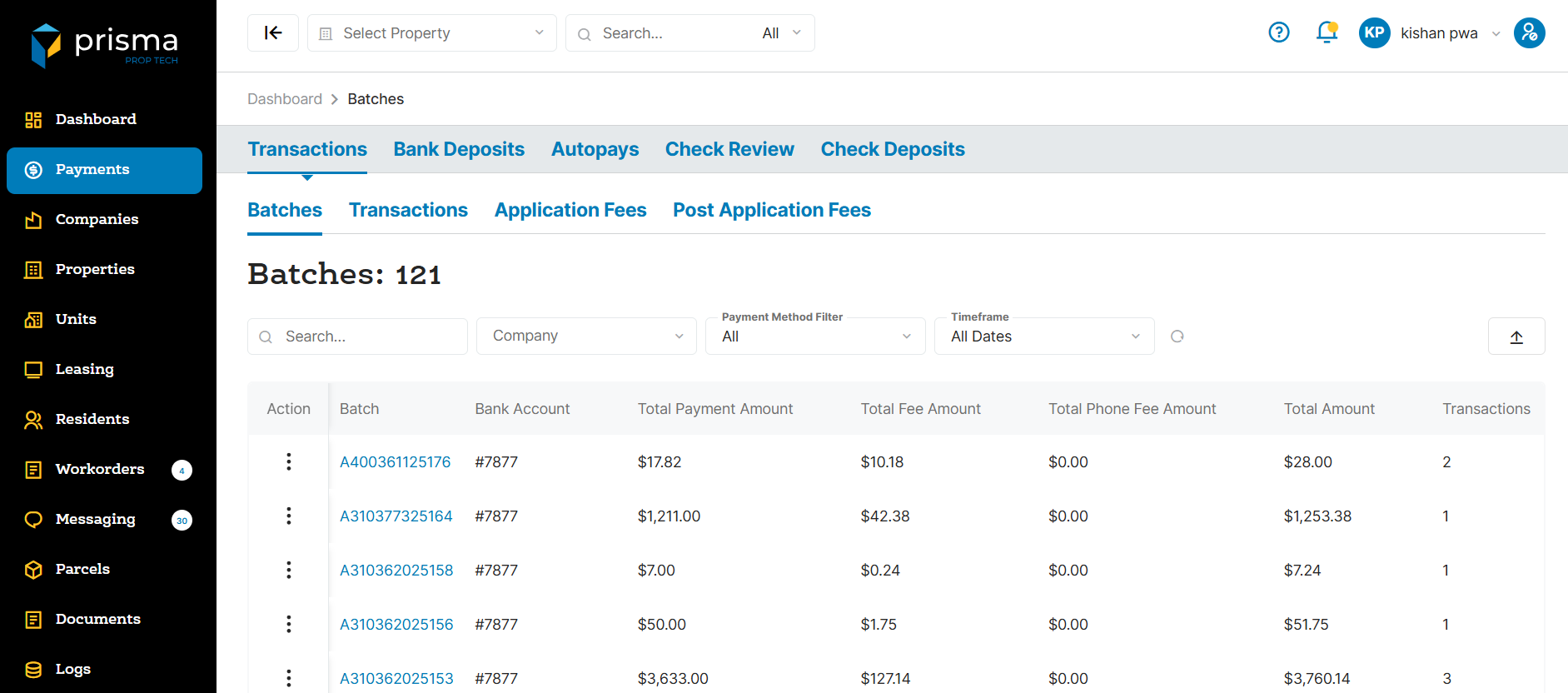
The Batch tab has the following filters available to use:
- Search – Allows you to search by batch ID or amount.
- Company – Allows you to filter by company, if you are associated to more than one.
- Payment Method Filter – Filter by batch payment type; Bank Account, Card, Mobile Check, Walk-In Cash or Manually Entered.
- Timeframe – Allows you to filter by date range.
Table: Batch Columns
| Field | Description |
| Action | Allows you to view the batch, view the transaction that are within the batch or view the bank deposit associated wtih the batch |
| Batch | The batch ID created by Prisma |
| Bank Account | The last four digits of the property bank account funds were deposited into |
| Total Payment Amount | The total payment amount, not including the platform fee |
| Total Fee Amount | The platform fee amount charged |
| Total Amount | The payment amount plus the platform fee amount |
| Transactions | The number of transactions within the batch |
| Property | The property name for which the batch is associated with |
| Company | The company name for which the batch is associated with |
| Opened At | The date and time stamp the batch was opened in Prisma |
| Closed At | The date and time stamp the batch was closed in Prisma |
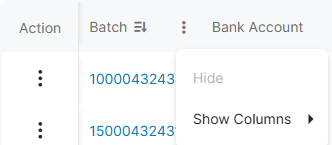
Within the columns, you may click the three dots and hide or show hidden columns to help make your view unique to you.
You may also drag and move columns so they are in the order of your preference.